Repairing may not be available if the product has been disassembled or tuned by the customer.
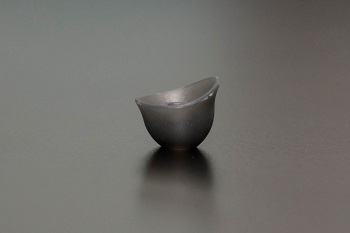
How to fasten silicon tips in the units of [AK T8iE/AK T8iE MKII]
1. The picture below is a silicon tip.
2. Please install it as shown below.
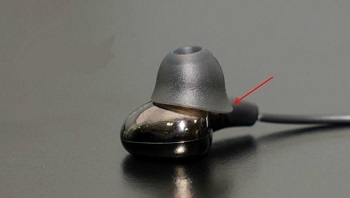
That is the right direction of silicon, please enjoy your earphone!
- In the AK100 II / AK120 II / AK240 / AK100 II_x_HCC / AK380 products
You can select the album art as the desired image when ripping with connecting AK CD-RIPPER.
(It is connected to Wi-Fi and can be changed even if CD album art is automatically displayed in Grace Note.)
You can edit it by touching the red part of the photo on the ripping screen.
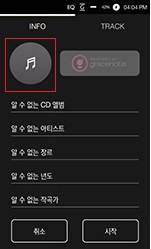
- Image files can be selected only in jpeg / png files in the internal repository - AlbumArt folder,
jpeg / png File size should be less than 2MB.
※ This function is available from:
[AK100 II / AK120 II / AK240 Firmware v1.28]
[AK380 Firmware v1.17]
[AK100 II_x_HCC Firmware v1.04].
1. AK380 Cradle is available for AK380 v1.14 or later,
AK300/320 is available for v1.00 or later firmware version.
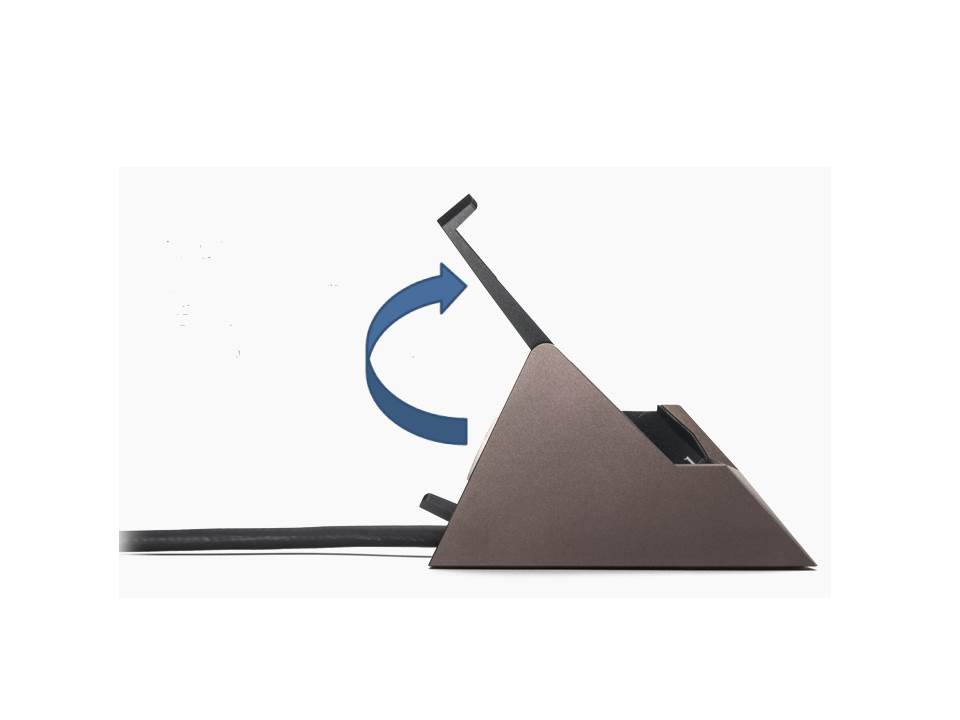
2. When Device is connected to the cradle and the clamp is raised and activated (See below picture)
It outputs to the XLR balance of the cradle,
and it does not sound even when connecting earphone to 3.5 terminal and 2.5 terminal of AK380/A320/AK300 main body.
3. When using the AK380 Cradle as a USB DAC, the XLR balanced output will not be out.
※ KANN compatible memory card guide ※
KANN supports up to 768GB capacity with built-in memory and microSD, SD slot.
KANN is equipped with 64GB high-speed memory.
The microSD slot also allows up to 256GB of memory,
Supports up to 512 GB of memory via the SD slot.
With both internal memory and memory slots,
KANN can store up to 768GB of source files.
The specifications of the memory card that has been confirmed as normal in KANN products are as follows
We recommend that you purchase a memory card that meets the following specifications.
▶ Memory card size: microSD, SD
▶ Manufacturer: SanDisk, Transcend, Samsung
▶ Capacity: microSD up to 256GB
SD up to 512GB
※ We recommend using SanDisk for 512GB SD card.
- Precautions when using memory card -
1. A memory card with a capacity of 64 GB or more is exFAT as the default file system.
You will need to use a separate program to format it with the FAT32 file system.
2. If you are purchasing an incompatible memory card, the memory card or
the files in the memory card may not be recognized properly or malfunction may occur.
※ KANN products USB terminal usage guide ※
KANN has two types of USB terminals.
- USB C Type terminal
- Micro 5pin USB terminal
◎ How to use each terminal:
▶ USB C Type: Transfer files by connecting with PC
Charge the product by connecting with PC and adapter
▶ Micro 5pin USB: Uses USB audio by connecting portable USB DAC
Use USB DAC by connecting to PC / MAC
Use AK Ripper by connecting
For more information on how to use it, please refer to the product user manual.
You can download it from IRIVER website.
This is a guide for using the 3.5mm / 2.5mm terminal shown in the picture below.
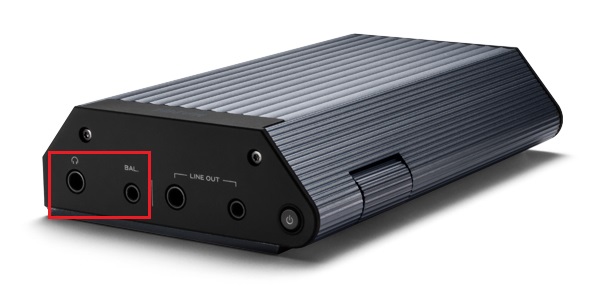
Unbalance Out (3.5mm jack) and Balanced Out (2.5mm jack) can be output simultaneously when playing music.
In other words, 3.5mm and 2.5mm both sound when connected to earphones at the same time output.
※ The volume value is output in the same size of 2.5mm / 3.5mm.
※ 3.5mm / 2.5mm terminal of line out is not applicable.
Repairing fees are a sum of the price for replaced parts, labor fee, and delivery fee.
(Price for replaced parts: prices for the components that have been replaced in the repairing process; labor fee: costs calculated in proportion to the repairing time and difficulty)
For product warranty, you must keep a receipt even though it is an accessory. If you cannot prove the date of purchase, the date of initial release will be applied to the warranty period.
Regardless of the warranty period, if the breakdown or damage is attributed to the customer’s fault, the customer must bear the repairing charge. As for accessories, the repairing charge may amount to as much as the initial purchase price depending on the type of repair or breakdown/damage.





