- In the AK100 II / AK120 II / AK240 / AK100 II_x_HCC / AK380 products
You can select the album art as the desired image when ripping with connecting AK CD-RIPPER.
(It is connected to Wi-Fi and can be changed even if CD album art is automatically displayed in Grace Note.)
You can edit it by touching the red part of the photo on the ripping screen.
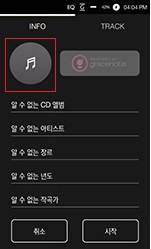
- Image files can be selected only in jpeg / png files in the internal repository - AlbumArt folder,
jpeg / png File size should be less than 2MB.
※ This function is available from:
[AK100 II / AK120 II / AK240 Firmware v1.28]
[AK380 Firmware v1.17]
[AK100 II_x_HCC Firmware v1.04].





